
📖 Overview
iFrame Block is a lightweight WordPress plugin that provides a native block for the WordPress Gutenberg editor, enabling content creators, editors, and developers to insert iframes cleanly and securely without writing raw HTML.
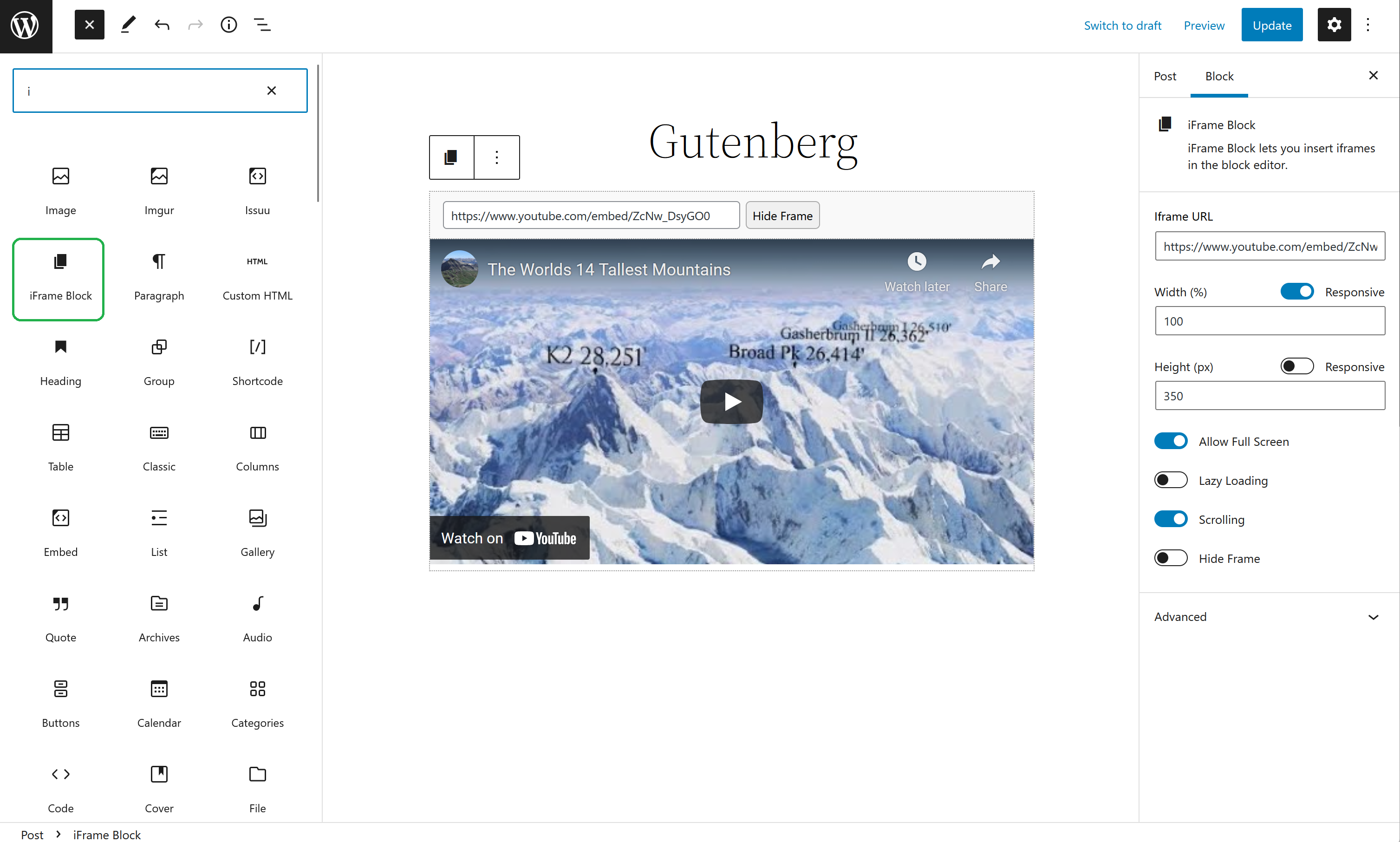
Whether you need to embed third-party web tools, interactive maps, forms, calculators, reports, or external dashboards, iFrame Block provides full control right from the editor sidebar: customizable widths, heights, responsive aspect ratios, border styling, lazy loading, and fullscreen support.
⭐ Key Features
- Native Gutenberg Block: Directly accessible under the WordPress Block Inserter (search "iframe" or "embed").
- Fluid Responsive Mode: Automatically maintains 16:9, 4:3, or custom ratios across desktops, tablets, and smartphones.
- Fixed Width & Height Mode: Specify exact pixel dimensions or percentage-based dimensions when exact sizing is needed.
- Border & Appearance Controls: Toggle borders on or off, configure border width in pixels, and set custom hex border colors.
- Allow Fullscreen: Enable the
allowfullscreenattribute for video embeds, interactive games, or presentation slides. - Lazy Loading Support: Integrates native browser
loading="lazy"to ensure external embeds never slow down page load times. - Scrolling Controls: Enable or disable iframe scrollbars according to embedded document height requirements.
- Zero Bloat: Clean block architecture with no external JavaScript libraries or heavy stylesheets.
📸 Screenshots & UI Preview
Click on any image to view high-resolution preview:
🚀 Installation & Setup
-
1
Log in to your WordPress Admin dashboard and navigate to Plugins → Add New.
-
2
Search for "iFrame Block" in the search bar.
-
3
Click Install Now and then click Activate.
-
4
Open any Post or Page in the Block Editor, click + (Add Block), and search for iFrame Block.
-
1
Download the latest release ZIP from GitHub:
iframe-block.zip -
2
In WordPress Admin, go to Plugins → Add New → Upload Plugin.
-
3
Choose the downloaded
iframe-block.zipfile and click Install Now. -
4
Click Activate Plugin. The block is immediately ready in Gutenberg.
For theme developers, site builders, or agency deployments, clone the repository directly into your plugins directory:
cd wp-content/plugins/
git clone https://github.com/vikas4travel/iframe-block.git
To modify the React block source code, check the developer repository:
git clone https://github.com/vikas4travel/iframe-block-dev.git
cd iframe-block-dev
npm install
npm run build
⚙️ Block Attributes Reference
| Attribute | Type | Default | Description |
|---|---|---|---|
| iframeBlockSrc | string | https://example.com/ | The destination web URL loaded inside the iframe. |
| iframeBlockResponsiveWidth | boolean | true | Whether iframe width expands to 100% fluid container. |
| iframeBlockHeight | string | 350 | Default frame height in pixels. |
| iframeBlockFullScreen | boolean | true | Enables the HTML5 allowfullscreen attribute. |
| iframeBlockLoading | boolean | false | Toggles browser native lazy loading (loading="lazy"). |
| iframeBlockScrolling | boolean | true | Enables iframe internal overflow scrolling. |
📝 Changelog
0.1.1
- Added responsive height option.
- Enhanced border size and color inspector controls.
- Compatibility verified up to WordPress 6.8.
0.1.0
- Initial public release of iFrame Block for WordPress Block Editor.