
📖 Overview
User Logs is an audit trail and activity logging plugin for WordPress administrators. It tracks critical events across your site: successful and failed user logins, user logouts, new user registrations, and comment submissions.
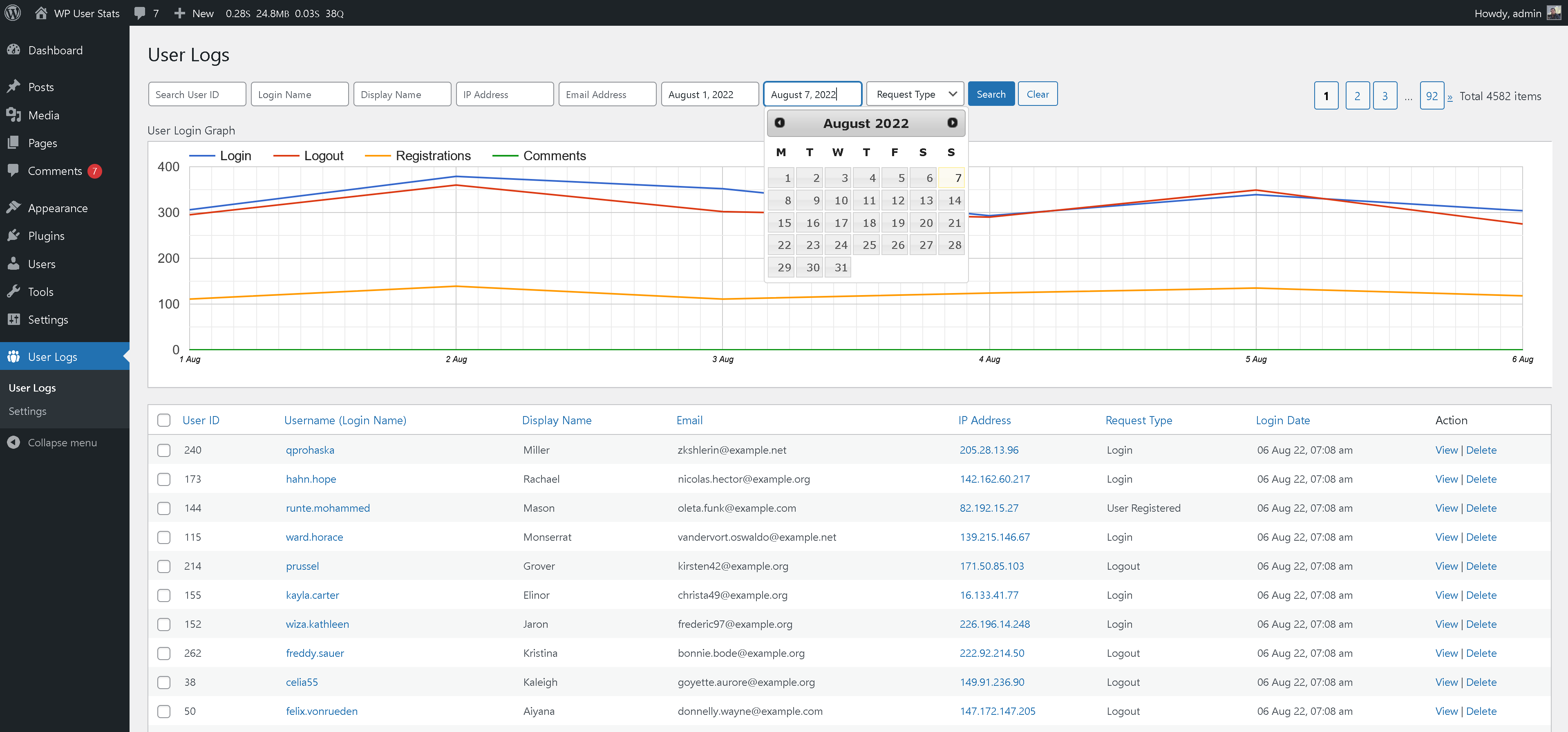
Equipped with interactive Google Line Charts, administrators can instantly pinpoint sudden spikes in registration bots, brute-force login attempts, or suspicious comment spam. The built-in IP filtering lets you isolate activity from specific addresses to investigate and block attackers promptly.
⭐ Key Features
- Comprehensive Event Tracking: Logs user logins, logouts, new user registrations, and posted comments automatically.
- Fight Spam & Brute Force: Filter logs by IP address to immediately identify suspicious bots and malicious actors.
- Interactive Google Line Charts: Visual representation of activity over time. Easily spot surges in user registrations or repeated login attempts.
- Detailed Audit Records: View IP address, user role, username, precise timestamp, and browser user-agent for every event.
- Configurable Retention: Prune logs automatically to maintain database efficiency without consuming excessive storage.
- Lightweight Architecture: Built with lean database indexes so logging does not impact site performance or page load times.
📸 Plugin Screenshots
Click on any screenshot to view high-resolution preview:
🚀 Installation & Setup
-
1
Navigate to Plugins → Add New in your WordPress Admin.
-
2
Search for "User Logs".
-
3
Click Install Now and then click Activate.
-
4
Access the audit dashboard from the WordPress admin menu under User Logs.
-
1
Download
user_logs.zipfrom GitHub:user-logs.zip -
2
Go to Plugins → Add New → Upload Plugin and upload the ZIP.
-
3
Click Activate Plugin.
Deploy directly via Git inside your WordPress plugins directory:
cd wp-content/plugins/
git clone https://github.com/vikas4travel/user-logs.git
⚙️ Admin Dashboard Guide
Once activated, User Logs adds a top-level menu item to your WordPress sidebar:
- Logs Table: Displays recent events in reverse chronological order. Columns include Event Type, Username, IP Address, Timestamp, and View Details link.
- Activity Graph: Renders interactive Google Charts showing event counts per day over the selected date range.
- IP Filter Bar: Input any IP address to isolate all activity logged from that visitor.
- Settings: Manage log retention limits and configure automatic cleanup routines.
📝 Changelog
1.0.3
- Verified compatibility with WordPress 6.8.
- Updated Google Charts loader to the latest stable release.
- Enhanced database queries for large log datasets.
1.0.0
- Initial public release of User Logs.