
📖 Overview
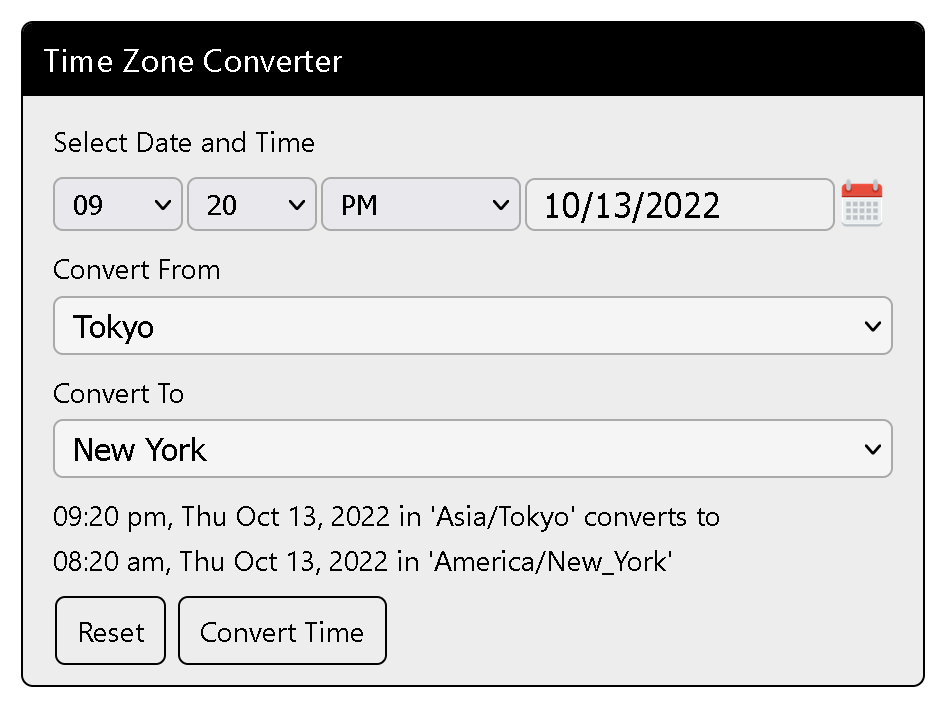
Time Zone Converter allows users to convert and compare time between world cities and global time zones in real-time. Featuring a clean, quick, and easy-to-use interface, it is perfect for websites scheduling international webinars, sports streaming, remote meetings, podcasts, and worldwide announcements.
The plugin provides full control over the widget appearance via WordPress settings: customize background colors, font sizes, text colors, and borders to harmonize perfectly with any WordPress theme.
⭐ Key Features
- Multi-City & Timezone Comparison: Compare time between major global cities (London, New York, Tokyo, New Delhi, Sydney, etc.) instantly.
- Interactive Date & Time Pickers: Integrated jQuery UI calendar date picker and time selector for fast user inputs.
- Comprehensive Style Customization: Adjust widget background color, label font size, text colors, and border styling through the admin panel.
- Audience Engagement Booster: Keeps visitors on your page when planning events, broadcasts, or consultations.
- Fully Responsive Layout: Seamless layout scaling across small mobile screens, tablets, and full-width desktops.
- Lightweight Codebase: Fast asset delivery with zero unnecessary third-party dependencies.
📸 Plugin Screenshots
Click on any image to view high-resolution preview:
🚀 Installation & Setup
-
1
Navigate to Plugins → Add New in your WordPress Admin.
-
2
Search for "Time Zone Converter".
-
3
Click Install Now and activate the plugin.
-
4
Insert the shortcode
[time-zone-converter]on any page or post.
-
1
Download
time_zone_converter.zipfrom GitHub:time-zone-converter.zip -
2
Go to Plugins → Add New → Upload Plugin and upload the ZIP file.
-
3
Click Activate Plugin.
Deploy directly via Git inside your WordPress plugins directory:
cd wp-content/plugins/
git clone https://github.com/vikas4travel/time-zone-converter.git
⚙️ Shortcode & Usage Reference
Place this shortcode anywhere on your site:
[time-zone-converter]
Admin Settings Reference
Under Settings → Time Zone Converter in WordPress Admin, configure:
- Title Display: Show or hide widget heading title and set font size/color.
- Background & Border Colors: Customize panel background and container border hex colors.
- Labels & Text: Edit labels for "Select Date:", "Select Time:", and "Convert From:".
- Default Selected Timezone: Choose which timezone is pre-selected for incoming visitors.
📝 Changelog
1.0.3
- Compatibility tested up to WordPress 6.8.
- Optimized jQuery UI CSS assets for modern theme templates.
1.0.0
- Initial public release of Time Zone Converter.